
'%3e%3cpath%20d='M31.96%2042.4211V31.2583H35.3337L35.8398%2026.9067H31.96V24.1288C31.96%2022.8693%2032.2738%2022.011%2033.9025%2022.011L35.9764%2022.01V18.1178C35.6177%2018.066%2034.3866%2017.9474%2032.9537%2017.9474C29.9616%2017.9474%2027.9132%2019.975%2027.9132%2023.6978V26.9067H24.5293V31.2583H27.9132V42.4211H31.96Z'%20fill='white'/%3e%3c/g%3e%3cdefs%3e%3cclipPath%20id='clip0_820_4965'%3e%3crect%20width='22.8941'%20height='24.4737'%20fill='white'%20transform='translate(19.6235%2017.9474)'/%3e%3c/clipPath%3e%3c/defs%3e%3c/svg%3e)
'%3e%3cpath%20d='M36.9363%2019.0706H25.6868C22.0255%2019.0706%2019.0469%2022.0424%2019.0469%2025.6954V36.9196C19.0469%2040.5724%2022.0255%2043.5442%2025.6868%2043.5442H36.9365C40.5976%2043.5442%2043.5762%2040.5724%2043.5762%2036.9196V25.6954C43.5762%2022.0424%2040.5976%2019.0706%2036.9363%2019.0706ZM31.3116%2037.9992C27.6132%2037.9992%2024.6045%2034.9973%2024.6045%2031.3074C24.6045%2027.6174%2027.6132%2024.6156%2031.3116%2024.6156C35.0099%2024.6156%2038.0186%2027.6174%2038.0186%2031.3074C38.0186%2034.9973%2035.0099%2037.9992%2031.3116%2037.9992ZM38.179%2026.1937C37.0861%2026.1937%2036.1972%2025.3068%2036.1972%2024.2163C36.1972%2023.1259%2037.0861%2022.2388%2038.179%2022.2388C39.272%2022.2388%2040.161%2023.1259%2040.161%2024.2163C40.161%2025.3067%2039.2719%2026.1937%2038.179%2026.1937Z'%20fill='white'/%3e%3cpath%20d='M37.8527%2023.9653C37.402%2023.9653%2037.0352%2024.3315%2037.0352%2024.7811C37.0352%2025.2308%2037.402%2025.5969%2037.8527%2025.5969C38.3036%2025.5969%2038.6704%2025.2311%2038.6704%2024.7811C38.6704%2024.3312%2038.3036%2023.9653%2037.8527%2023.9653Z'%20fill='white'/%3e%3cpath%20d='M27.2234%2031.3073C27.2234%2029.0581%2029.0575%2027.2284%2031.3116%2027.2284C33.5659%2027.2284%2035.3999%2029.0581%2035.3999%2031.3073C35.3999%2033.5564%2033.5659%2035.3863%2031.3116%2035.3863C29.0575%2035.3863%2027.2234%2033.5564%2027.2234%2031.3073Z'%20fill='white'/%3e%3c/g%3e%3cdefs%3e%3cclipPath%20id='clip0_820_4970'%3e%3crect%20width='24.5294'%20height='24.4737'%20fill='white'%20transform='translate(19.0469%2019.0706)'/%3e%3c/clipPath%3e%3c/defs%3e%3c/svg%3e)



What Operators Should Check After Setup Before a Gaming System Becomes Part of Daily Use
The successful installation of an interactive platform is often celebrated as the final milestone. The software environment is deployed, remote master credentials are hand-delivered, the login interface loads without errors, and management is eager to open the floor to customers.
However, in the commercial amusement and retail sweepstakes sector, a completed gaming system setup is merely a technical benchmark—not a guarantee of operational security. Moving too fast from initial installation to live customer transactions without a systematic audit opens your venue to immediate compliance risks, internal cashier fraud, and costly credit discrepancies. To protect your startup capital, location owners must execute a rigorous post-setup review before the platform becomes part of daily operations.
Why Technical Setup Is Not the Same as Daily Operational Readiness
A standard installation process is highly narrow in scope. Technical teams focus strictly on core infrastructure: establishing host connectivity, verifying database communication modules, and ensuring individual kiosks load the game catalog.
Day-to-day retail operations demand a completely different layer of stability. In a live environment, your management team is not just interacting with a game menu; they are responsible for safeguarding cash flows, cross-checking shift reports, and adjusting payout parameters. A platform that technically launches perfectly can still trigger operational chaos if its administrative layout is confusing, or if employee transaction limits are left unconfigured. Treating installation as a finished product rather than a framework waiting for customization is a primary reason new venues face early financial leakage.
Critical Post-Setup Review: The Core Operator Audit
Immediately following your primary gaming software setup, you must execute a tailored operator setup checklist. This audit verifies that your internal administrative controls match your specific business model and protect your cash drawer.
Establishing Role-Based Access and Security Boundaries
At initial deployment, systems frequently default to broad testing permissions, which are highly dangerous for daily operations.
- Clerk vs. Manager Separation: Ensure that standard desk clerks are restricted to basic player account creation and balance recharges. They must remain completely blocked from adjusting overall system hold percentages, modifying game parameters, or deleting transaction history sheets.
- Remote Session Security: Audit all active administrative profiles. Wipe out all default vendor passwords, restrict remote browser logins to authorized manager IP addresses, and set automated idle session timeouts to prevent unauthorized access at the counter.
Synchronizing Balance Recharges and Payout Mechanisms
Your credit processing channels must be thoroughly simulated before handling live customer cash.
- Recharge Ceiling Limits: Configure your gaming system backend to enforce hard caps on the volume of credits a single cashier can generate during a shift. This single setting completely mitigates the risk of an employee loading massive balances for external accomplices.
- Payout Authorization Protocols: Test the exact workflow for processing winning redemptions. Ensure the backend requires secondary manager override approval for payouts exceeding a designated threshold, protecting your daily retail float from sudden depletion.
Backend Architecture and Daily Workflow Clarity
The backend interface is your operational cockpit. If the layout is poorly organized or demands excessive menu navigation to execute a simple balance verification, your checkout counter efficiency will plummet during peak traffic hours.
Visualizing Critical Data on the Dashboard
A professional control panel should deliver an absolute overview of your venue’s performance within seconds. Managers must be able to view live kiosk uptimes, track active player balances, and monitor real-time net win statistics without drilling down through multiple confusing tabs. If tracking an operational anomaly requires extensive menu digging, your backend configuration is not yet optimized for daily deployment.
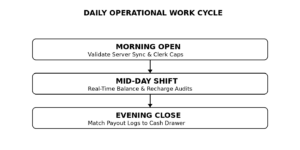
Establishing the Daily Operational Work Cycle
The software environment must align seamlessly with your physical store rhythm rather than adding extra administrative friction. Your team should understand the explicit checklist for every 24-hour cycle:
- The Morning Open: Verifying server database synchronization, checking local network stability flags, and activating employee shift caps.
- Live Mid-Day Monitoring: Tracking real-time recharge volumes and investigating any sudden terminal disconnects.
- The Nightly Close: Exporting unalterable backend ledger reports to verify that your physical cash register perfectly mirrors the platform’s digital transaction history.
Support Readiness: What to Clarify Before Emergencies Occur
Even the most stable digital architecture will eventually face localized hardware interruptions, ISP dropouts, or player transaction disputes. In the B2B gaming environment, hitting operational limits or encountering a freeze is rarely caused by a software bug—it is almost always the result of avoidable setup mistakes and a lack of troubleshooting preparation.
Operators must audit their gaming system support channels before an operational outage impacts customer retention. Clarify your exact service level agreements (SLAs) with your distributor:
- What is the guaranteed response speed for critical, point-of-sale technical troubleshooting?
- Is your support line a direct, 24/7 phone channel or a delayed email ticketing system?
- Does your on-site team know the explicit protocol for distinguishing a localized hardware failure from a global platform server drop?
Common Avoidable Mistakes Before Routine Use Stabilizes
- Bypassing the Trial Phase: Rushing from initial technical installation straight to a full public launch without running a 48-hour closed-door simulation is a recipe for immediate financial errors.
- Neglecting Internal Training Documentation: Assuming your staff will instinctively understand the backend interface leads to inconsistent ledger recording. Create a localized, single-page reference sheet outlining your exact rules for processing player deposits and redemptions.
- Ignoring Local Power and Data Buffering: Failing to test how your backend handles a sudden, abrupt power failure or network disconnect often results in lost transaction logs or corrupted player account balances when the system reboots.
The Strategy for Stable Daily Operations
Transitioning smoothly from a raw technical installation to a predictable revenue generator requires a disciplined implementation strategy.
| Operational Focus | Target Requirement | Testing and Validation Protocol |
| Role Enforcement | Cashier isolation | Attempt to access master administrative configuration files using a basic clerk profile. |
| Financial Ledger Sync | 100% cash matching | Process a series of mockup recharges and payouts, export the shift ledger, and confirm it matches your cash drawer. |
| Network Interruption | Data preservation | Disconnect the local venue network switch during an active session to confirm the backend buffers data without credit loss. |
| Support Escalation | Rapid ticket execution | Run a test support query to verify real-world distributor response speed and communication accuracy. |
By investing the necessary hours to carefully audit your administrative tools, configure tight clerk boundaries, and validate your reporting infrastructure early, you transform a generic technical setup into a highly secure, automated, and deeply optimized B2B asset.